
Context graph visualization and content serving
What does a knowledge graph look like to a human?
One of the questions I kept coming back to while building this is: how do you make a knowledge graph legible to someone who didn’t build it? The backend is all SPARQL, RDF triples, named graphs, inference rules — none of which are friendly to humans who just want to understand what’s in the system. The web interface is my answer to this.
I built the frontend using Astro with React Islands. Astro does server-side rendering for the static parts (navigation, layouts, entity metadata displayed as HTML) and React handles the interactive parts (the entity graph visualization, the SPARQL explorer, the normalization explorer). This setup is a nice balance — fast initial load because most of the page is server-rendered, interactive components where you actually need them.
The entity page as the core unit
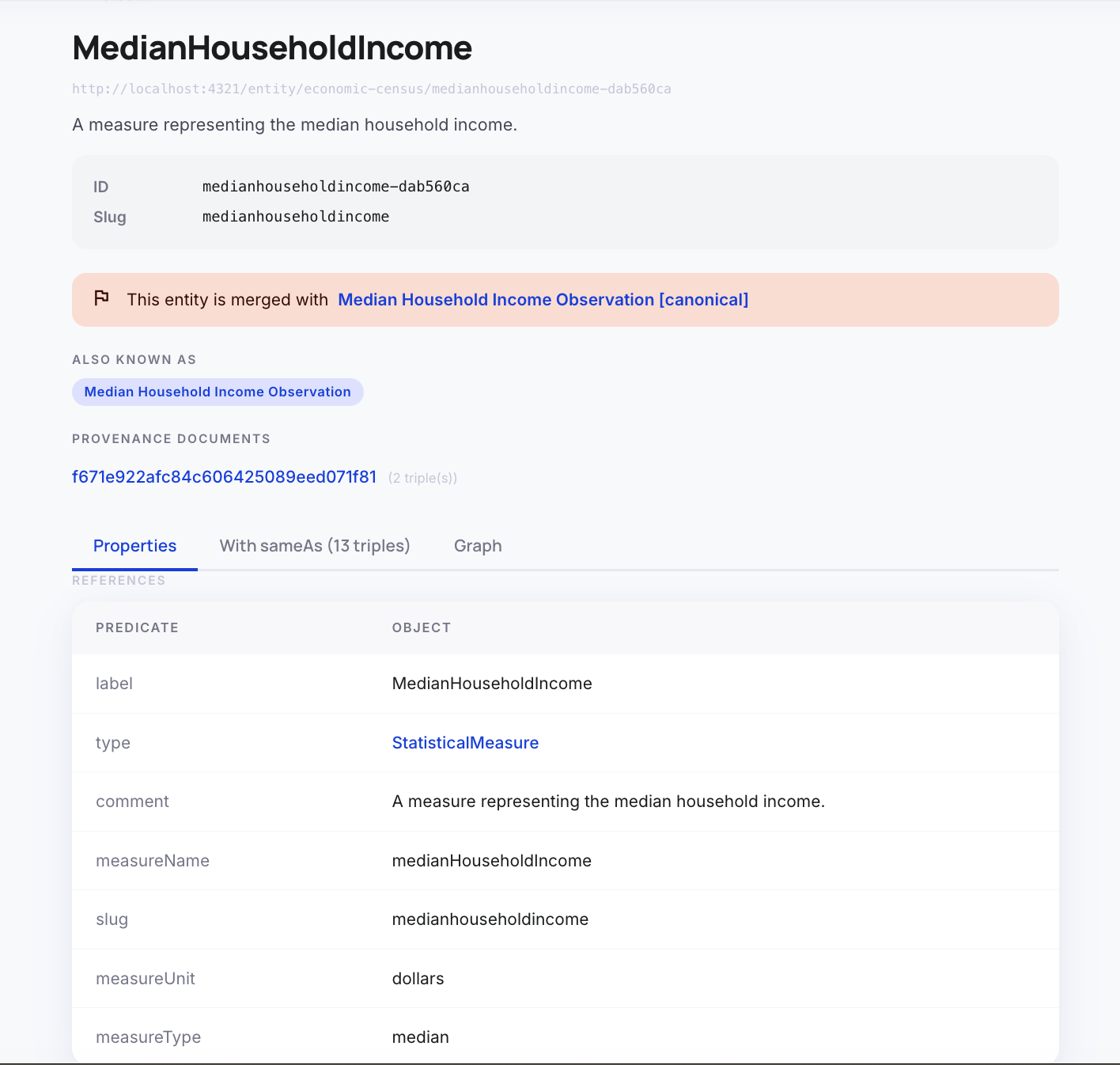
The fundamental unit of navigation in the UI is the entity page. By design in the RDF framework, every entity in our store has a URI. What we built here is a web page that backs that exact URI, so that every entity’s URI is a web page. This is meant to feel like a Wikipedia article for that entity. You land on a page, you see the entity’s label, its type, a description, and a list of all properties and relationships linked to it.
This page serves as the serving layer for humans. When we cite information, we cite using that URI. This means every piece of information can be traced back to this page. You can send an email with this URI, put it in a report, or use it as a reference, and it’s guaranteed not to break.
This is where our earlier discussions about stable entity identity over time all come together. Because we use a non-destructive normalization strategy (as discussed in Part 5) instead of a “nuke and rebuild” approach, the identity of the entity persists over time. Stable entity identity means stable URIs, which means stable web pages that you can confidently cite externally.
The entity page also shows exactly which documents this entity was extracted from — with links to the original document. This is the provenance chain in action: every assertion in the graph traces back to a source document.
One thing that took some thought was how to handle normalization on the entity page. If “King County, WA” and “King County, Washington” are linked by owl:sameAs, should they show as separate pages or the same page? I went with separate pages, but both pages show the sameAs cluster — you can see which entities this entity is considered equivalent to. The canonical entity has a special marker. Navigating to a non-canonical entity redirects you to the canonical one.
Below is an example of an entity page with links to other entity pages.
The entity graph visualization
The most visually interesting part of the UI is the force-directed graph visualization on each entity page. I used react-force-graph-2d for this, which is a canvas-based force simulation library. The graph starts with the central entity (gold node) and its immediate neighbors (the entities it has direct relationships to). You can expand to depth 2, 3, or 4 with button clicks, fetching additional hops from the SPARQL backend.
While this is useful for visualization to clearly show that the underlying data is a graph, my sense is that most people would prefer to view the data just as a standard web page. The graph can get really busy very quickly, and once you expand a few highly connected nodes, it becomes a chaotic hairball that’s very hard to traverse. The structured text on the entity page is ultimately much more useful for day-to-day human consumption.
The normalization cluster
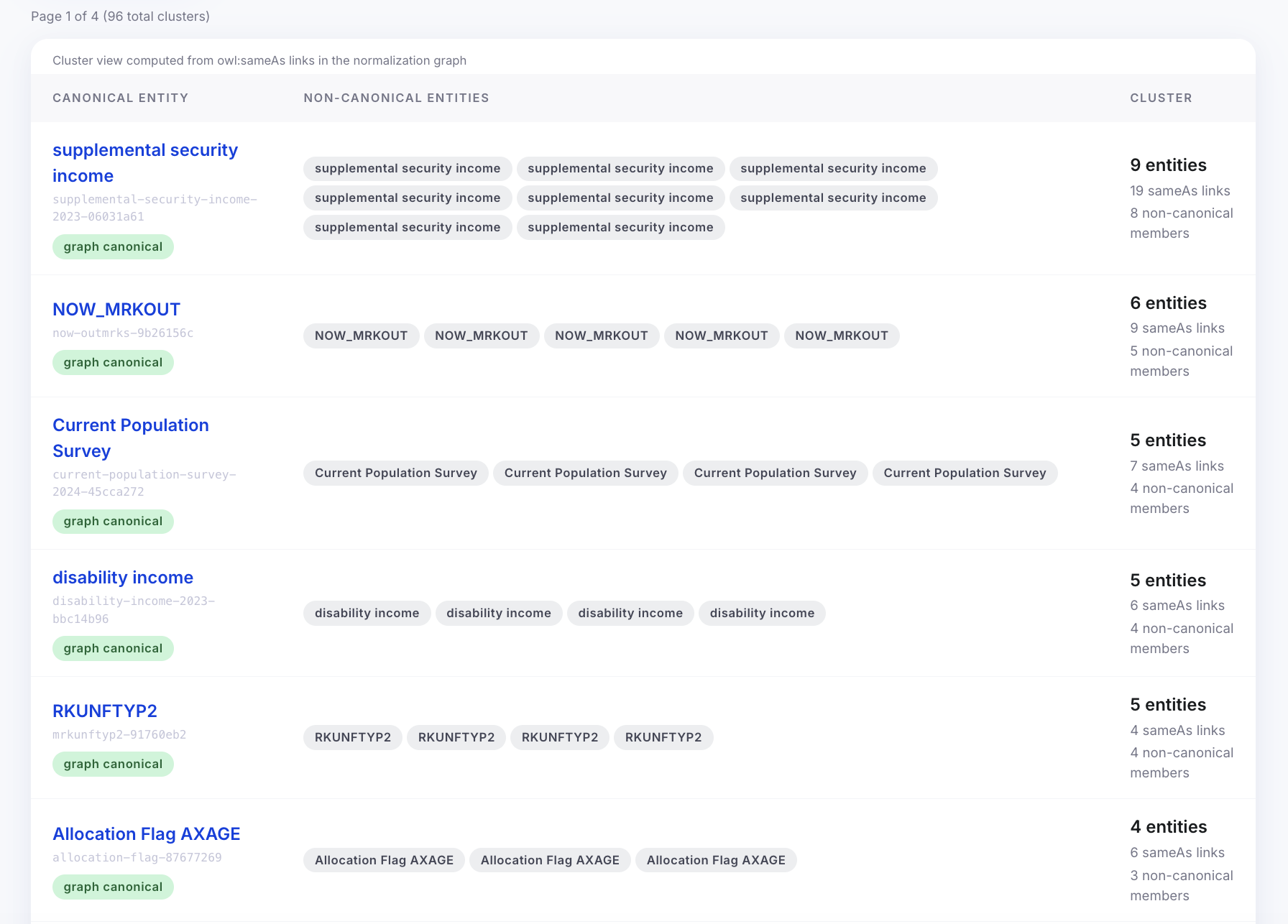
The normalization cluster is a UI for browsing the owl:sameAs clusters in the graph. For each cluster, you can see: which entity is canonical, all the variant entities that are equivalent, the confidence scores of each sameAs link, and which normalization method produced each link (exact-label, jaro-winkler, or llm-judge).
This is the administrative view — it lets you spot normalization decisions that look wrong. Maybe two entities got merged because their labels are similar but they’re actually different things. The provenance annotation tells you the confidence and method, so you know whether to trust it. In a fuller system, there would be a way to manually correct a bad merge from this UI. I didn’t build that part.
Below is an example of an normalization cluster page.
The reasoning playground
The reasoning playground is a UI for testing backward chaining reasoning. Unlike forward chaining (which materializes triples into the database), backward chaining evaluates rules on-demand at query time.
This playground allows us to write specialized rules of various patterns to see what types of inference reasoning we can do. For example, we can write a rule for “Geographic context derivation” — stating that an economic indicator is implicitly in a region if its associated source document is in that region. Or we can write rules to classify entities into specific ontology classes based on predicate patterns. You write a SPARQL query that invokes the reasoner, and it shows you both the raw query results and an explanation of which rules fired to produce them. It’s a powerful way to test how we can derive new knowledge on the fly without cluttering the triplestore.
What I think about this
Here is a quick summary of the design decisions I made for the data visualization and serving layer, and my assessment of them:
| Decision / Role | Choice made | Assessment |
|---|---|---|
| Serving Layer | URI-backed Web Pages | Essential. By making every entity URI a stable web page, we create a robust serving layer for humans. It allows for unbreakable external citations and perfectly leverages our stable entity identity strategy. |
| Web Framework | Astro + React Islands | Excellent. Astro’s server-side rendering is perfect for the static metadata on entity pages, while React handles the interactive explorers only when needed. Fast and lightweight. |
| Visualizing the Graph | Force-directed graph (react-force-graph-2d) | Mixed. It’s great for proving that the data is a graph, but it gets too busy and hard to traverse for real work. The structured text on the Wikipedia-style entity page is much more practical. |
| Testing Inference | Reasoning Playground | Very useful. It provides a clear way to test and understand backward chaining rules (like geographic derivation) on the fly without materializing unnecessary triples. |
Navigation: